
Oily Residue and Impossible Angles: Anatomy of the Subway Nightmare
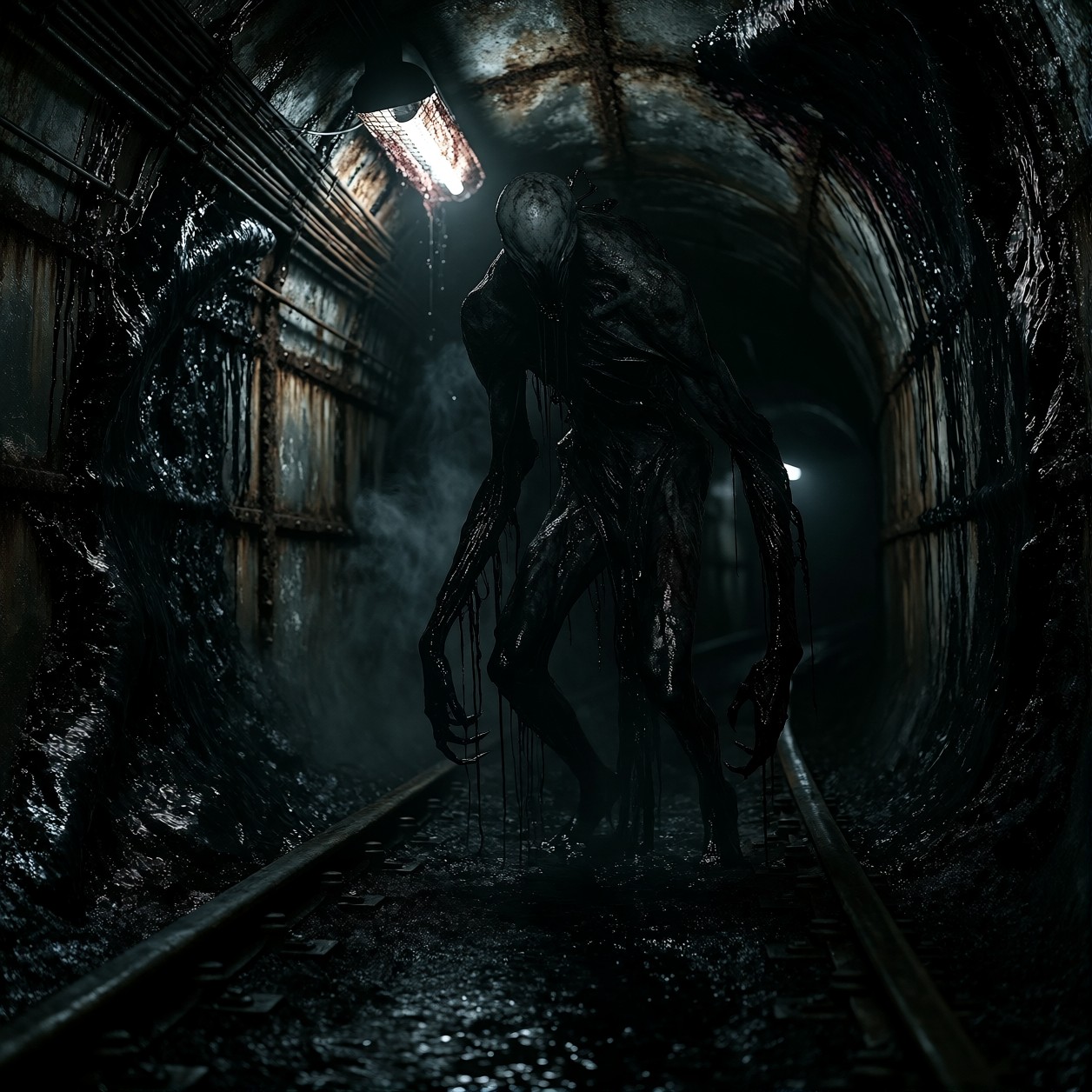
The "obsidian-like organic residue" coating that decaying subway tunnel does more than just set a dark tone — it becomes the texture against which the horror is measured. Under Aurelia 2's rendering, that pitch-black sheen creates a canvas of deep contrast, making the pale, featureless mask of the central figure pop with an almost ghostly luminescence. The model latches onto the "chiaroscuro high-contrast lighting" instruction to carve out the figure from the shadows, turning the flickering fluorescent lamp into a narrative spotlight that emphasizes the impossible angles of the limbs.
Aurelia 2's strength in rich visual storytelling shines here; it doesn't just render a monster, it constructs a scene dripping with dread. The "razor-sharp focus on the glistening textures" ensures that every drop of black liquid feels visceral and tangible, wrapping the viewer in that claustrophobic atmosphere before they even notice the figure's distorted face.
Grimdark Concept Art and Book Covers
This kind of hyper-detailed horror aesthetic is ideal for visual development in survival horror games or concept art for dark fantasy novels. The vertical composition naturally lends itself to book covers, where the towering figure dominates the negative space above a title.
For best results, stick to a portrait orientation like 832x1216 or 960x1440. The creature's elongated limbs require that vertical stretch to look truly unnatural — a landscape crop would truncate the horror and flatten the composition.
Settings for Proxima Aurelia 2 — Cranking Up the Tension
Since this is based on the Flux Schnell architecture, Aurelia 2 responds best to settings that allow it to calculate detail without over-saturating the darkness. The "Obsidian Nightmare Horror Style" LoRA at 100 (or 1.0) acts as a total style override, so your base prompt needs to be clean and directive.
- CFG / Guidance Scale:
3.5–4.0— Aurelia handles slightly higher guidance well; this keeps the "razor-sharp focus" on the creature's features without blowing out the highlights. - Steps:
28–30— Full aesthetic quality requires these steps to resolve the oily textures and film grain correctly. - Resolution:
960x1440(3:4) — Captures the full height of the figure while maintaining that oppressive tunnel framing.
The LoRA weight is set to100for maximum style impact. If you find the horror elements becoming too abstract, drop the weight to75to let more of Aurelia's base anatomical logic take over while keeping the aesthetic.
Working with Full-Weight Style LoRAs
At a weight of 100, the "Obsidian Nightmare" style dictates the entire visual language. The model will prioritize the oppressive atmosphere and distorted anatomy above all else.
- High Weight (
80–100): Use when you want a stylized, almost comic-book or graphic novel horror look where lighting is exaggerated and colors are deep. - Medium Weight (
50–70): Drops back the "obsidian" dominance slightly, allowing for more realistic skin tones on the figure and less stylized environmental corruption.
Five Directions to Deepen the Horror
5 Specific Variations for This Prompt
- Change the angle of view: Add "low angle shot, looking up from floor level" — this exaggerates the height of the figure, making it loom larger and more threatening over the viewer.
- Shift the lighting source: Replace the "flickering fluorescent lamp" with a "single red emergency bulb strobing" — this introduces a color palette of deep blacks and violent reds, increasing the sense of alarm.
- Alter the creature's pose: Change "stands motionless" to "crouching on the ceiling, limbs splayed like a spider" — moves the threat from standing confrontation to an ambush scenario.
- Enhance the environmental decay: Add "cracks in the concrete revealing pulsating veins of dark matter" — pushes the "organic residue" concept further into biological horror.
- Focus on the liquid: Emphasize "macro details of black sludge dripping from the figure's fingertips, close up" — shifts focus from the wide scene to a visceral, gross-out detail shot.
Two Prompts Ready to Generate
Apply two of the variations above to get distinct flavors of horror — one playing with perspective and height, the other shifting the lighting mood entirely.
Variation: low-angle perspective to exaggerate the figure's towering height and create a more threatening silhouette.
Obsidian Nightmare Horror Style. Low angle shot looking up at a pitch-black decaying subway tunnel coated in oily obsidian residue. A towering grotesque figure crouches on the ceiling above, elongated limbs splayed against the dark. Below, a pale faceless mask stares down with stretched seamless skin. Thick black liquid drips from the creature onto rusted tracks below. Flickering red emergency light casting long shadows. Chiaroscuro lighting, deep dread, hyper-detailed horror aesthetic, 8k resolution.
Variation: red emergency lighting instead of white fluorescent, creating a violent color palette and sense of active danger.
Obsidian Nightmare Horror Style. A horror scene in a subway tunnel slick with oily black residue. A pale, featureless humanoid figure stands amidst deep shadows, illuminated only by a strobing red emergency bulb. The light catches the glistening sheen of the organic coating on the walls and the distorted face of the entity. Thick dark mist fills the air. High contrast, cinematic film grain, terrifying atmosphere, razor-sharp focus.
More Dark Aesthetics in This Category
If you are exploring these darker, high-contrast themes, these related prompts offer similar levels of tension and detailed horror aesthetics: