

The Micro-Detail of Ice and Feathers: Mastering the Winter Forest Portrait
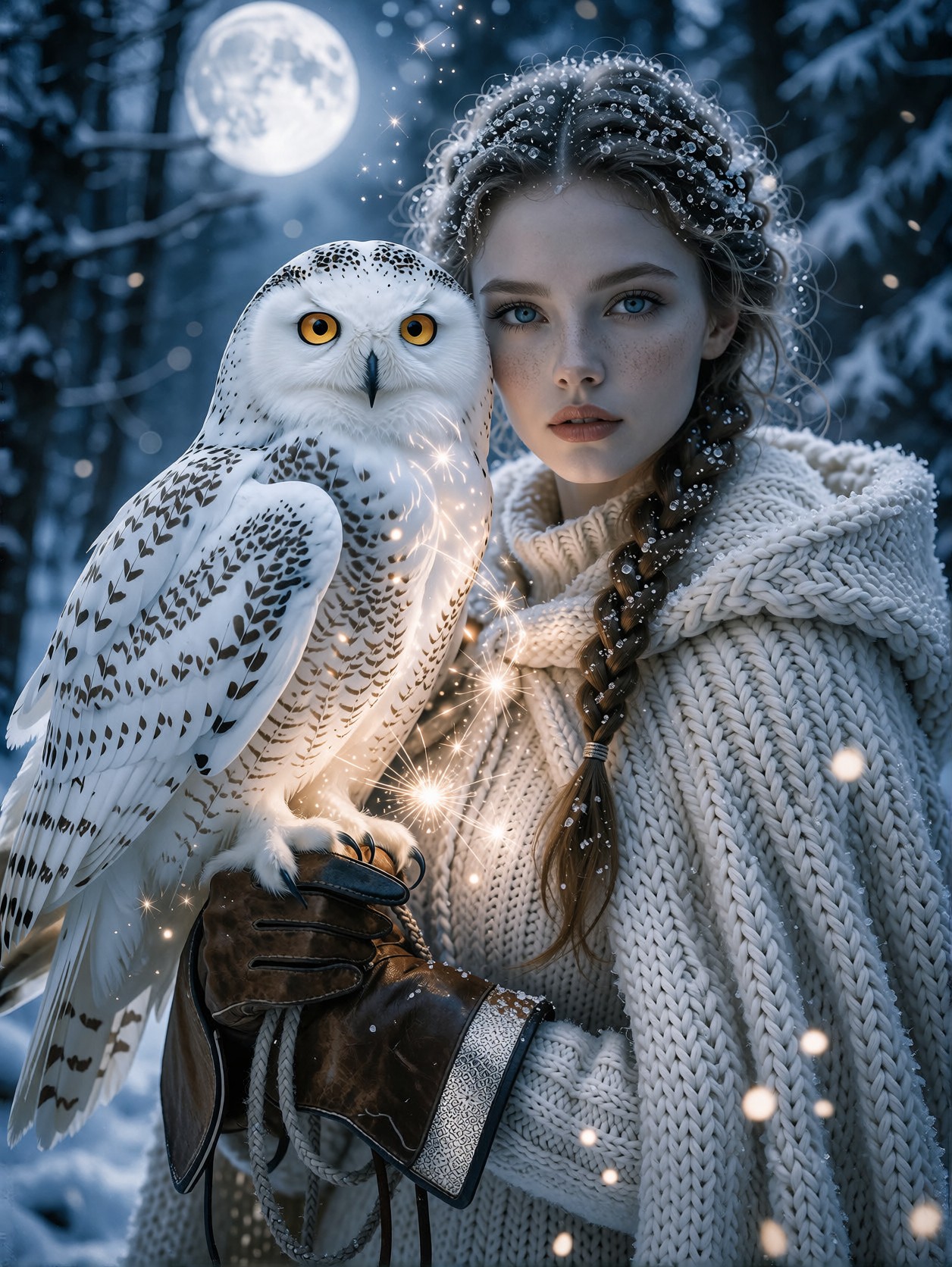
The visual tension in this portrait lives in the contrast between the fragile, delicate nature of ice crystals resting on a woman's eyelashes and the heavy, rich textures of her wool cloak and the owl's intricate feathers. This is not just a scene; it is a study in extreme fidelity. Krea 2, combined with layered LoRAs, is tasked with resolving every single fiber of that wool and every microscopic pattern on the bird's wing, pushing the definition past simple photorealism into a realm of meticulously rendered digital art.
The lighting is the master of the mood here: the cool, detached blue of the twilight moonlight is intentionally battling the encroaching warmth of magical, golden sparkles. This high-contrast lighting setup creates dramatic shadows that make the subject pop against the mystical winter backdrop. The final result feels like a cinematic still from a high-budget fantasy epic, delivering true 8k visual impact.
Creating High-End Digital Art and Book Covers
This level of detailed, highly atmospheric generation is perfect for designers and artists who need high-impact, ready-to-use assets. If you are looking to create cover art for a dark fantasy novel, concept art for a prestige television series, or truly unique high-definition wallpaper, this prompt provides a fantastic starting point. It manages to be hyper-realistic while still retaining a strong artistic, mythical flavor.
Given the complexity and the desired high fidelity, this portrait works best in a standard portrait aspect ratio (like 2:3 or 3:4) to allow the viewer to appreciate the intricate layering of the forest and the subject's details without unnecessary cropping.
Optimal Settings for Krea 2 — Blending Complex Styles
Since Krea 2 excels at intelligent style blending, the key here is how you manage the three LoRAs: the Celestial Glow, the Dark Painterly mood, and the nostalgic 80s Horror aesthetic. These are three very different energies, so precise weighting is crucial.
- Guidance Scale (CFG): 7–9. Because the prompt demands "zero compression artifacts" and "ultra-detailed" textures, you need a high guidance scale. This tells the model to adhere strictly to the prompt's detailed instructions.
- Steps: Aim for 25–30. With three heavy LoRAs, the model needs maximum steps to reconcile the conflicting visual information (e.g., blending photorealism with 80s grainy VHS texture).
- LoRA Combination Strategy: Start with the base weights provided. If the image looks too bright and too clean, try increasing the Horror 1980x weight to 55–65. This will introduce the desirable grain and dark atmosphere that makes the image feel less like a clean digital render and more like a captured piece of cinematic history.
Layering the Styles
The most important aspect of this prompt is the conflict between the three styles. GPT style (celestial glow) provides the opulence, Ethereal Dark Fantasy Painting provides the mood, and Horror 1980x provides the grit and atmosphere. Use the weights to control which style dominates the final aesthetic.
Five Ways to Push the Forest Portrait Further
5 Targeted Variations for This Prompt
- Shift the Mood (Cold vs. Warm): Change "cool blue moonlight" to "harsh, sickly neon pink streetlights, melting snow" — this moves the scene from mystical fantasy into a neo-noir dystopian setting, dramatically altering the mood.
- Change the Subject's Interaction: Replace "holding a majestic snowy owl" with "holding a glowing, crystalline shard of ancient technology" — shifts the theme from nature/mythology to science-fiction/pre-apocalyptic survival.
- Intensify the Art Style: Change "photorealistic" to "hyper-detailed stained glass mosaic, gothic revival style" — this forces the model to abandon the realistic texture and lean heavily into the painterly/architectural aspects of the fantasy genre.
- Adjust the LoRA Focus: Increase the weight of
Horror 1980xto 75 and decrease all others. This will push the entire scene into a dark, high-contrast, VHS-corrupted survival horror vibe. - Expand the Environment: Change "mystical winter forest" to "a decaying marble greenhouse overgrown with frozen ivy" — this provides a more structured, overgrown, and eerie environment, contrasting with the organic wilderness.
Two Prompts Ready to Generate
Here are two complete strings that apply two of the variations above, tailored for Krea 2's blending capabilities.
Variation: Dystopian Neo-Noir Shift — replaces the organic forest and warm sparkles with industrial decay and harsh neon lighting.
HD detail restoration, portrait of a young woman in a decaying industrial warehouse, standing in heavy snow, holding a glowing crystalline shard, illuminated by harsh neon pink and electric blue streetlights, cinematic, hyper-detailed knit wool cloak, extreme contrast, zero compression artifacts, photorealistic, 8k, dystopian neo-noir, Krea 2.
Variation: Stained Glass Gothic — swaps the realistic textures for a high-detail, monumental architectural art style.
Stunning portrait of a young woman framed by a massive Gothic cathedral window, winter forest viewed through intricate stained glass mosaic, individual ice crystals sparkling across the glass, dramatic lighting, hyper-detailed stained glass art, rich jewel tones, high contrast, museum quality, Krea 2.
Discover More AI Art in the Mystical Genre
If the concept of blending nature with impossible detail appeals to you, these related prompts explore similar themes of grandeur and hidden beauty, ranging from historical opulence to surreal landscapes.