

Black Lattice Against Falling Snow: The Anatomy of This Beauty Portrait
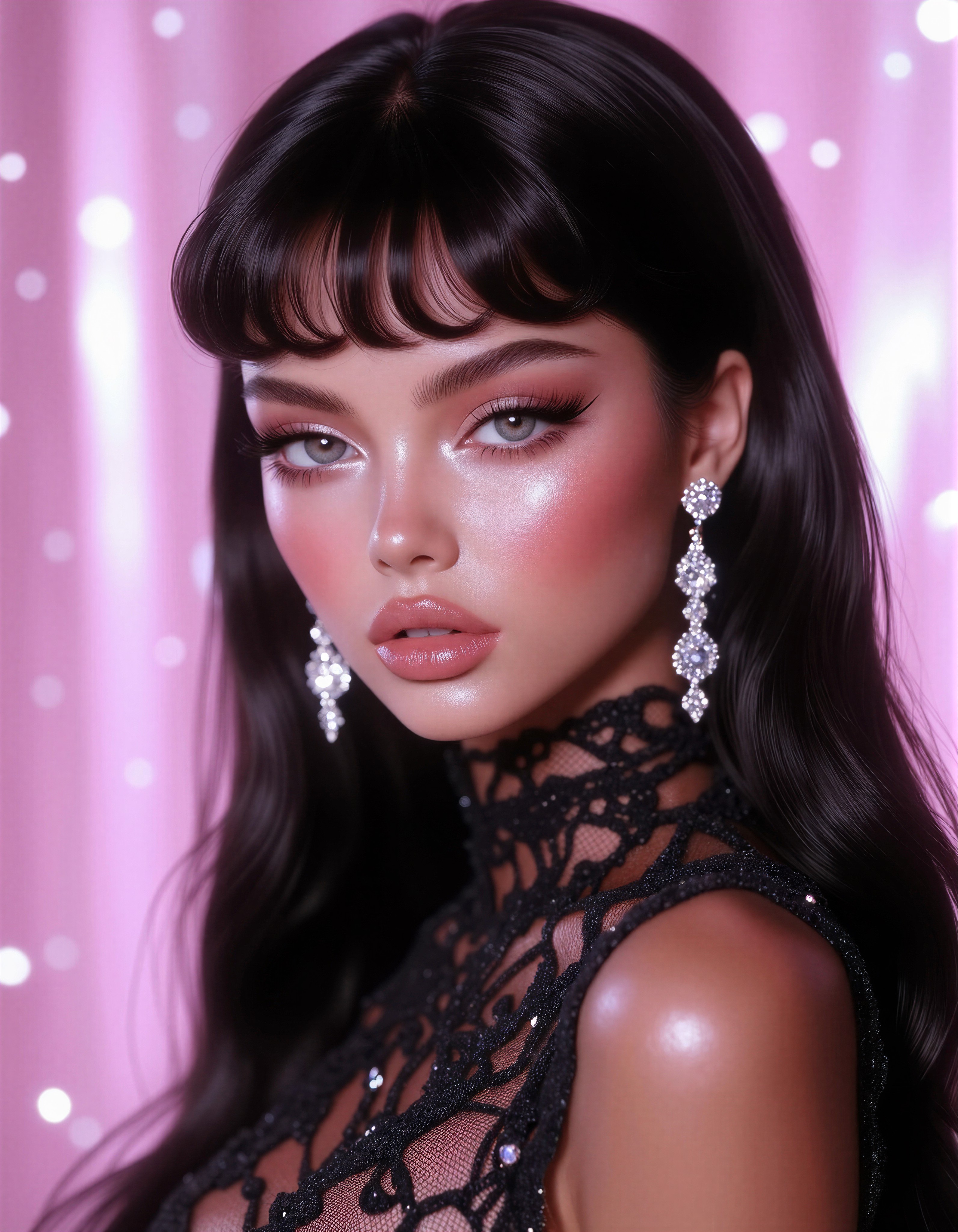
The strongest contrast in this composition isn't makeup or lighting — it's the lattice-like fabric pressed against the throat. High-neck black weave is one of the hardest garments for image models to render convincingly, because the openwork pattern must stay consistent where it curves around the neck. Flux Maestro handles that semantic precision well, keeping the lattice crisp while the snow-textured background melts into soft bokeh behind it.
The face carries the glamour: voluminous lashes, shimmering eyeshadow, glossy nude lips, and sleek black hair falling in one unbroken sheet over both shoulders. The 8K, hyper-realistic textures, sharp focus stack pushes detail exactly where it matters — lash tips, lip gloss highlights, individual sparkle on the earrings — while the blurred background absorbs everything else.
Cosmetics Campaigns, Editorial Spreads, and Beauty Brand Work
Beauty portrait prompts like this map directly onto cosmetics and lash-brand advertising, fashion magazine editorials, hairstyle salon portfolios, and jewelry product showcases — the dangling earrings get their own spotlight at this crop. Winter-themed luxury campaigns (perfume, skincare, festive collections) benefit from the snow-like background without needing an actual location shoot.
Stick to portrait orientation, 3:4 or 2:3. The vertical crop flatters the cascading hair and keeps the lattice neckline visible. Square works for social media; 16:9 will force awkward cropping of either the earrings or the hair.
Tuning Flux Maestro for Gloss, Lattice, and Sparkle
Flux Maestro prioritizes prompt adherence and semantic accuracy, which means word order matters — whatever you name first gets the most rendering attention. "Beauty Portrait" leading the string is correct here; if you moved the background description to the front, the snow bokeh would start competing with the face.
- CFG / Guidance:
3.0–3.5— glossy lips and shimmer need smooth gradients; higher values harden the highlights into plastic-looking sheen - Steps: 20–30 for final quality, especially for the earring sparkle and lattice weave; 12 steps for composition previews
- Resolution:
1080×1440(3:4) for standard editorial;1344×1792when the image is destined for print or large-format display
If the lattice fabric fuses into a solid black block, raise it in the prompt — move "intricate high-neck black lattice fabric" directly after the subject description so it claims more of the model's attention.
Balancing the Three-LoRA Stack
- Grim Dark Glamour 80s at
0.50— the anchor style: silvery shimmer and vintage high-fashion attitude. At 0.50 it flavors the lighting without hijacking the composition - Dark Glamour 80s at
0.50— reinforces the dreamy glow and glossy makeup rendering. Two glamour LoRAs at equal weight stack multiplicatively, so 0.50 + 0.50 reads closer to a single 0.70 — leave both there unless the look becomes too retro - Pink Barbie at
0.35— a whisper-level accent. Below0.30it does nothing; above0.50it drags the palette toward candy pink and fights the black-lattice elegance. Keep it as seasoning, not sauce
Want a purer editorial look? Drop Pink Barbie to 0.20 or remove it entirely — the two glamour LoRAs already carry the shimmer.
Five Ways to Reshape This Beauty Portrait
5 Targeted Variations for the Lattice-Neck Glamour Shot
- Flip the season: Replace "snow-like textures" with "falling golden confetti, warm champagne bokeh" — the winter serenity turns into a celebration or awards-night mood, and the black lattice gains warmth instead of frost
- Swap the hair texture: Change "long sleek black hair" to "voluminous auburn curls" — the Dark Glamour 80s LoRA at 0.50 is already tuned for this; expect stronger retro energy and a softer silhouette
- Color-blocking the neckline: Replace "black lattice-like fabric" with "scarlet lattice-like fabric" — the same openwork structure, but the red against pale skin creates a far more aggressive editorial statement
- Push Pink Barbie forward: Keep the prompt identical but raise Pink Barbie to
0.60and add "soft pink gradient background" — the whole image shifts toward glossy modern Barbiecore while the lattice keeps it fashion-forward - Tighten to a beauty macro: Add "extreme close-up, cropped above the lips to the forehead, cosmetic advertisement framing" — trades the full portrait for a skincare/cosmetics-grade macro where the shimmering eyeshadow becomes the hero
Two Prompts Ready to Generate
Both examples apply variations from the list above, tuned for Flux Maestro at cfg 3.5, 25 steps, 3:4 portrait.
Variation: golden confetti season-flip — winter frost becomes awards-night celebration, warming the black lattice and earrings
Beauty Portrait. Fashion Photography. A highly stylized artistic portrait of a woman with long sleek black hair cascading over her shoulders. Meticulous makeup: dramatic voluminous eyelashes, shimmering eyeshadow, glossy nude lips. Intricate high-neck garment of black lattice-like fabric. Large sparkling earrings. Background softly blurred with falling golden confetti, warm champagne bokeh, celebratory. Luxury, elegance, soft glamorous lighting, hyper-realistic textures, sharp focus on face and fabric, 8K.
Variation: beauty macro crop — same styling pushed into a cosmetics-advertisement extreme close-up where eyeshadow and lips dominate
Beauty Portrait. Extreme close-up cosmetic advertisement framing, cropped from forehead to above the lips. Shimmering silver eyeshadow, dramatic voluminous eyelashes, glossy nude lips with mirror highlights, flawless hyper-realistic skin texture. Hints of black lattice fabric and sparkling earring at frame edges, snow-like bokeh background. Soft glamorous studio lighting, sharp focus, luxury beauty campaign, 8K.
More Glamour Portraits Worth Studying
These prompts explore the same polished-portrait territory with different styling directions — platinum limousine luxury, gold adornment, kimono serenity, and lantern-lit enchantment: