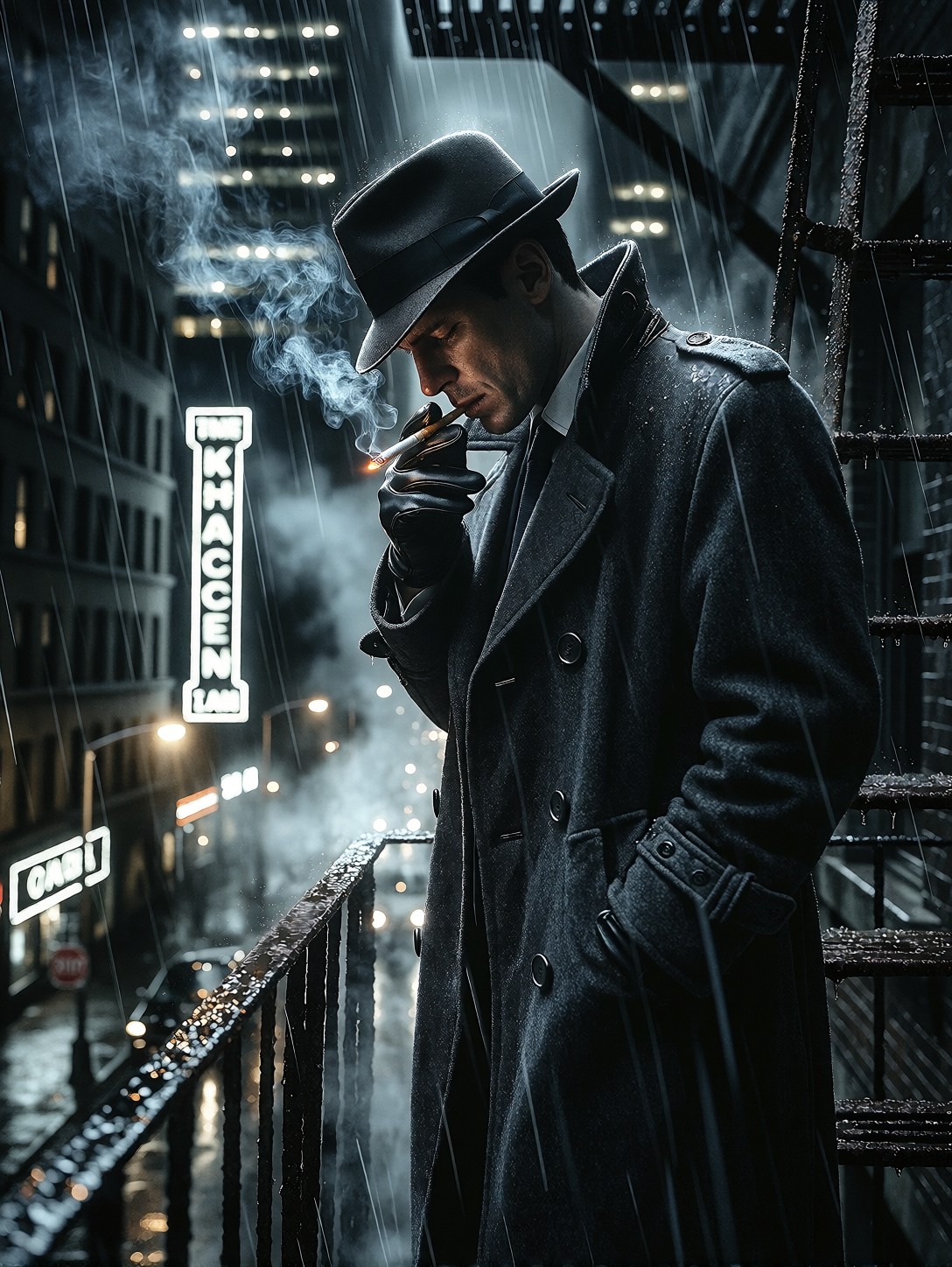


Razor-Sharp Noir and Neon Rain: How This Detective Scene Works
The tiny glowing tip of a cigarette offers the only warmth in a scene dominated by charcoal greys and cold neon. Proxima Aurelia 2 thrives on this kind of high-stakes visual storytelling, using its "intelligent composition" engine to balance the heavy figure of the detective against the sprawling, fog-choked skyscrapers below. The model's strength lies in rendering wet surfaces — the waterlogging of a wool trench coat and the slick sheen of rusting iron are critical here, textures that ground the cinematic atmosphere in reality. Stark white neon signs provide the key lighting, creating deep, razor-sharp shadows that define the noir aesthetic without requiring complex shading instructions.
Cover Art, Game Concepts, and Visual Novels
The medium-full shot framing is ideal for character-focused media where the environment sets the mood but the detective remains the focal point. This output works exceptionally well as a game concept art asset for urban fantasy titles, a book cover for noir mystery novels, or a visual novel background where narrative tension is key.
For maximum impact, stick to the vertical orientation of the original prompt using 832×1216 (2:3). However, if you want to emphasize the scale of the city, switch to 1344×756 (16:9) and change "medium-full shot" to "wide establishing shot".
Settings for Proxima Aurelia 2 — Balancing Cinematic Style and LoRA Layers
Proxima Aurelia 2 is designed to create breathtaking masterpieces with rich visual storytelling, but it can be prone to over-stylization when heavy LoRAs are applied. Use the settings below to maintain the sharp contrast of the noir aesthetic without losing the photorealistic base.
- CFG / Guidance:
3.5–4.0— standard for Aurelia to keep shadows deep but highlights intact - Steps: 24–28 for rich texture rendering; 12 is sufficient for quick composition checks
- Resolution:
1080×1440(3:4) — native portrait balance; use1344×756for cinematic widescreen
Aurelia handles high-contrast lighting beautifully, but pushing the contrast too hard with LoRAs can lead to muddy mid-tones. Rely on the prompt's "razor-sharp" instruction rather than over-cranking guidance.
Strategic LoRA Combinations
You have four strong stylistic tools here, but combining all four will likely create a confused aesthetic. Select one dominant style and support it with a secondary texture/style:
- Cinematic Shot Look (0.60) + Dark Sensual Gothic Fantasy Style (0.45): This is the powerhouse combo. Cinematic establishes the camera lens and lighting, while Dark Gothic adds that moody, painterly depth to the rain and fog.
- Midjourney-Style Rendering (0.50) + Gothic Mystic Portrait Style (0.35): Use this for a more illustrative, less photorealistic look. It leans into the "painting" aspect of noir rather than the "photograph". Drop Cinematic to 0.20 here to avoid clashing lens styles.
- Single LoRA approach: Sometimes Aurelia doesn't need help. Try running
Cinematic Shot Lookat just0.35to nudge the lighting without overriding the model's natural photorealism.
Five Ways to Push the Noir Detective Further
5 Targeted Variations for This Prompt
- Shift the Era: Replace "stark white neon signs" with "gas lamps and steam vents". This transforms the setting from modern noir to early 20th-century steampunk, adding brass textures and orange warmth.
- Change the Weather: Swap "misty rain" for "heavy snowfall, frost on the railing". The wet fabric becomes frosted wool, and the neon lights diffuse into soft halos rather than sharp beams.
- Alter the Perspective: Change "medium-full shot" to "low angle looking up from the alley floor, detective looming large against the moon". This adds intimidation and scale, making the city feel more oppressive.
- Introduce Narrative Conflict: Add "a shadowy figure with a umbrella watching from the opposite roof". This immediately sets up a cat-and-mouse dynamic, turning a portrait into a scene.
- Time of Day Shift: Replace "3 AM" with "dawn, purple and orange sky breaking through fog". The lighting shifts from artificial neon to natural atmospheric gradient, softening the harsh noir contrast.
Two Prompts Ready to Generate
Apply two of the variations above directly — both are tuned for Proxima Aurelia 2 at the settings recommended above.
Variation: Snowy noir — replaces rain with heavy snowfall, turning wet neon into soft halos and adding frost to the trench coat
Noir Style, Cinematic. Medium-full shot of a tired male detective standing on an iron fire escape above a dark city street at 3 AM. He wears a heavy charcoal-grey wool trench coat dusted with snow, high popped collar, dark fedora, leather gloves holding a lit cigarette with a tiny glowing tip. Heavy snow falls between dark skyscrapers, lit only by stark white neon signs and street lamps cutting through the misty storm. Dramatic high-contrast shadows, razor-sharp detail on frosted fabric and rusting iron, photorealistic, 8k resolution.
Variation: Steampunk era — replaces neon with gas lamps and brass details, shifting the color palette to warm oranges and deep browns
Noir Style, Cinematic. Medium-full shot of a tired male detective standing on an ornate iron fire escape above a dark city street at 3 AM. He wears a heavy charcoal-grey wool trench coat with brass buttons and a high popped collar, dark fedora, leather gloves holding a lit cigarette. Thick fog rolls between towering brick buildings, lit only by warm gas lamps and steam vents cutting through the mist. Dramatic chiaroscuro lighting, razor-sharp detail on wet fabric and rusting iron, photorealistic, 8k resolution.
More Prompts in This Direction
Other prompts in this category explore different lighting and moods while maintaining that rich, aesthetic quality: