

The Intersection of Dusty Leather and Celestial Opulence: Mastering Hyper-Detail
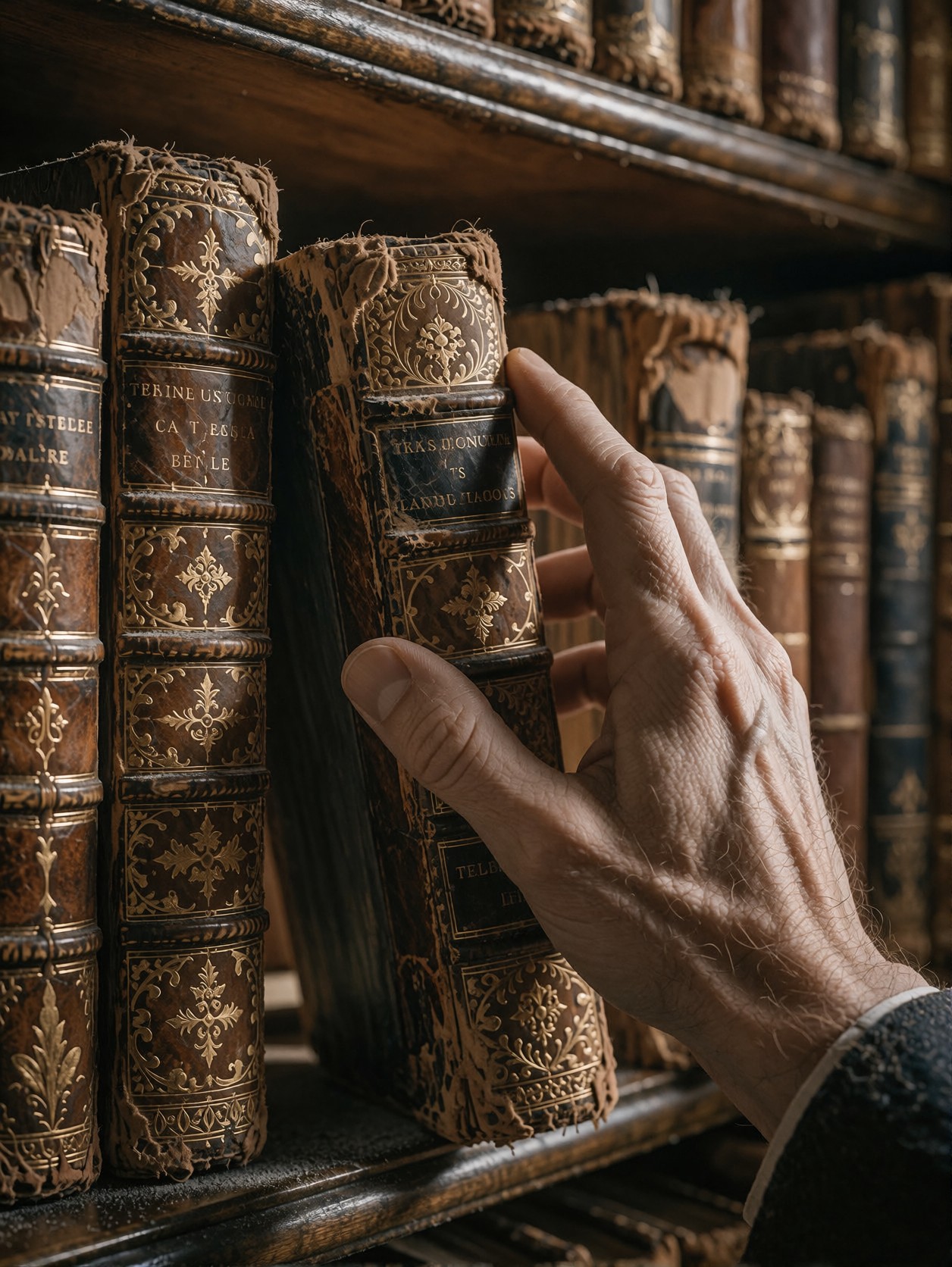
The tactile reality of a hand brushing against worn leather, carrying the fine dust of decades, is what makes this prompt so compelling. It’s a study in extreme fidelity, capturing the microscopic chaos of an old library shelf against the rich, focused glow of a single ambient light source. This isn't just a picture of a hand; it's a digital recovery of texture. Krea 2 is the ideal engine for this level of detail, as it excels at intelligently blending the highly textural requirements of "dust catching the light" with the smooth, high-definition clarity demanded by the prompt.
By combining photorealism with heavy LoRA influence—especially the "GPT style" and "Ethereal Dark Fantasy Painting"—the resulting image takes on a mythic weight. The prompt demands zero noise, pushing the model to achieve an almost hyper-real perfection that balances the grittiness of the old book with an elevated, cinematic grandeur ✨.
When to Use High-Fidelity Still Life Prompts
This type of highly detailed, atmospheric shot is invaluable for specific creative projects. If you are a concept artist looking for a library or study background, a book reviewer needing high-quality mock-up assets, or a photographer aiming for a moody, rich interior shot, this prompt delivers. It works best in a close-up or medium shot composition, focusing on the interaction between the subject (the hand) and the object (the book).
For maximum impact, stick to a vertical or square aspect ratio to allow the density of the book spines to fill the frame without feeling claustrophobic. Krea 2 handles the complex lighting naturally, so you don't need to over-specify the light source—let it interpret the "warm, focused ambient" instruction.
Optimizing Generation Settings for Krea 2
Krea 2 shines in aesthetic blending, meaning the key is setting the right balance between the base prompt and the LoRAs. Since you are aiming for hyper-clarity and photorealism, keep your resolution high and focus on the model's inherent strength in composition.
- Guidance/CFG: 7.0–9.0. Krea 2 needs a strong guidance scale to adhere to the strict "zero noise" and "highly textured" instructions, ensuring the model doesn't drift into artistic abstraction too early.
- Steps: 30 steps. Given the density of the prompt (texture, gold embossing, dust, skin pores), you want maximum iterative refinement to resolve the fine details.
- Resolution: Start at 1024x1024 (Square) for best LoRA blending, then upscale to 4K if the detail holds.
Layering the Three Powerful LoRAs
This is where the magic happens. You are blending three distinct styles: opulence, drama, and nostalgia. The weights suggest a careful balance:
- GPT style (55): This provides the luxurious, gilded foundation—the "opulence" of the library.
- Ethereal Dark Fantasy Painting (50): This adds the moody, painterly quality and dramatic lighting, ensuring the image doesn't look like a flat photograph.
- Horror 1980x (40): This is the secret weapon. It provides the necessary grit, film grain, and subtle "wear" that prevents the "GPT" and "Ethereal" styles from becoming too polished, grounding the image in a tangible, atmospheric reality.
Cinematic Variations for the Library Scene
5 Creative Directions to Experiment With This Scene
- Shift the Mood: Swap "Warm, focused ambient library lighting" for "Harsh neon fluorescent lighting and deep industrial shadows." This instantly transforms the scholarly atmosphere into a dystopian, late-night archive.
- Change the Medium: Replace "old book on a densely packed wooden library shelf" with "holographic data drive floating above a polished black obsidian surface." This shifts the context from classic literature to high-tech science fiction.
- Alter the Action: Instead of "reaching for an old book," try "a hand stained with ink, delicately tracing the title on a leather-bound book already open." This changes the moment from anticipation to active engagement.
- Cultural Twist: Replace "wooden library shelf" with "carved cedar display in a Victorian opium den." This changes the entire implied subculture and changes the expected texture of the surroundings.
- Embrace the LoRA: Double the weight of the "Horror 1980x" LoRA (e.g., to 70) and drop the others. The scene will become less "library" and more "horror-themed archive," perhaps with a sinister figure reaching for a forbidden tome.
Two Prompts Ready to Generate
These prompts apply two of the variations above, keeping the core elements of texture and detail while changing the environment and lighting for maximum contrast.
Variation: Dystopian Neon Archive — changing the warm library to a cold, futuristic setting with artificial lighting and digital objects.
A crystal-clear close-up of a hand reaching for a glowing holographic data drive on a metal shelf, illuminated by harsh neon blue and magenta lighting. High-fidelity clarity captures skin texture and digital interface detail. Cyberpunk archive setting, deep shadows, sharp focus, photorealistic, 8k resolution.
Variation: Victorian Opium Den — replacing the library with a richly carved, dark, and atmospheric Victorian setting.
A close-up of a hand stained with ink, delicately tracing the title of a leather-bound book in a richly carved Victorian opium den. Warm gaslight casting deep shadows, dense velvet and dark wood texture, photorealistic, highly detailed, cinematic, atmospheric.
Exploring Similar Textural Scenes
If you are enjoying the deep detail and atmospheric rendering of this prompt, these related scenes push similar boundaries—focus on environment, action, and high fidelity within complex settings.