Engraved Fantasy Blades on Velvet: The Art of Weapon Display
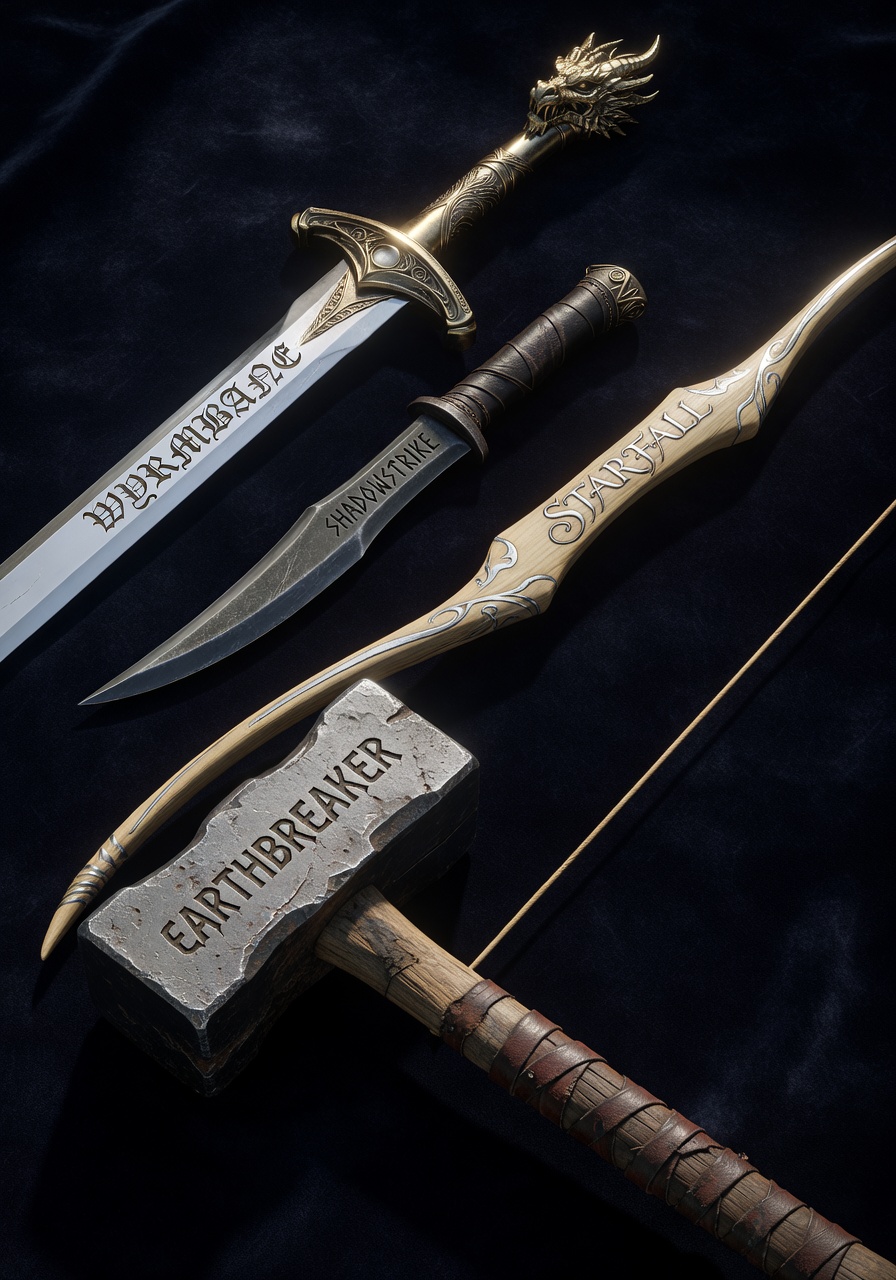
There's a quiet drama in the way WYRMBANE's dragon-headed pommel catches the light, its gold hilt gleaming against the black velvet like a secret weapon revealed. Grok Imagine doesn't just render weapons — it stages them, crafting a tableau where each blade tells a story through its engraving, material, and wear patterns.
The dark velvet surface becomes a stage, amplifying the metallic sheen of EARTHBREAKER's steel head and the pale wood grain of STARFALL's elven bow. Subtle wear details on the dagger's leather handle and the warhammer's stamped text add layers of history, while dramatic side lighting turns engravings into glowing script that could belong in a fantasy RPG manual.
3D Asset Libraries and Concept Art Workflows
This prompt is ideal for 3D artists building weapon libraries, concept designers working on fantasy game worlds, or UI developers creating inventory screens. The 8k resolution and photorealistic textures make it perfect for AAA game environments or high-fidelity concept art.
Stick to 16:9 aspect ratio for the display shot — it gives enough horizontal space to show all four weapons without crowding. For individual weapon close-ups, switch to 1:1 square format to highlight engraving details.
Optimizing Grok Imagine for Photorealistic Detail
Grok Imagine excels at contextual understanding, so be precise with material descriptions. For maximum photorealism:
- CFG Scale:
3.5–4.0— balances detail without over-contrasting the velvet background - Steps: 30 for full 8k resolution; 12 steps for quick previews
- Resolution:
8192×4608(16:9) — preserves weapon textures at maximum fidelity
At cfg 3.8, Grok Imagine renders the SHADOWSTRIKE dagger's angular runes with sharp clarity, making them feel like they were etched by a master blacksmith rather than generated by AI.
Five Ways to Reframe the Weapon Display
Targeted Variations for This Prompt
- Change the surface: Replace "dark velvet" with "obsidian stone" — the contrast becomes harder, the engravings more dramatic
- Add elemental effects: Add "glowing runes with blue energy" to STARFALL — turns the bow into a magical artifact
- Make it cinematic: Add "wide shot, dramatic golden hour lighting, shadowy background" — transforms the display into a fantasy shop window
- Focus on one weapon: Remove the other three weapons, add "close-up, 1:1 square, detailed engraving magnification" — ideal for weapon concept art
- Alter the materials: Change "silver blade" to "obsidian blade with red gem" — gives WYRMBANE a more sinister, magical look
Two Prompts Ready to Generate
Apply two of the variations above — both are optimized for Grok Imagine at the settings recommended above.
Variation: Obsidian stone surface with cinematic lighting — sharper contrast and more dramatic shadows
Game Asset. A set of four fantasy weapons displayed on an obsidian stone surface, each with engraved text on blade or handle: · "WYRMBANE" — a longsword with silver blade, gold hilt, dragon head pommel, text engraved along blade in gothic script · "SHADOWSTRIKE" — a curved dagger with dark steel blade, leather-wrapped handle, text etched near hilt in angular runic style · "STARFALL" — a elven bow of pale wood with silver inlay, text carved into the limbs reading "STARFALL" in elegant cursive · "EARTHBREAKER" — a massive warhammer with steel head, wood handle wrapped in leather, text stamped into metal reading "EARTHBREAKER" in bold block letters. Each weapon has realistic metal textures, subtle wear details, dramatic golden hour lighting highlighting engravings. Game-ready 3D assets, 8k.
Variation: Close-up of STARFALL with magical glow — transforms the bow into a mystical artifact
Game Asset. Close-up of the "STARFALL" elven bow, displayed on dark velvet surface with glowing runes emitting soft blue energy, pale wood with silver inlay, text carved into the limbs reading "STARFALL" in elegant cursive. Realistic wood textures, subtle wear details, dramatic side lighting highlighting the magical glow of the engravings. Game-ready 3D asset, 8k, 1:1 square format.
Explore Related Game Asset Prompts
Other prompts in this category focus on different aspects of game design — from UI interfaces to magical effects: