

The Intersection of Hyper-Detail and Mythic Scale in Fantasy Character Art
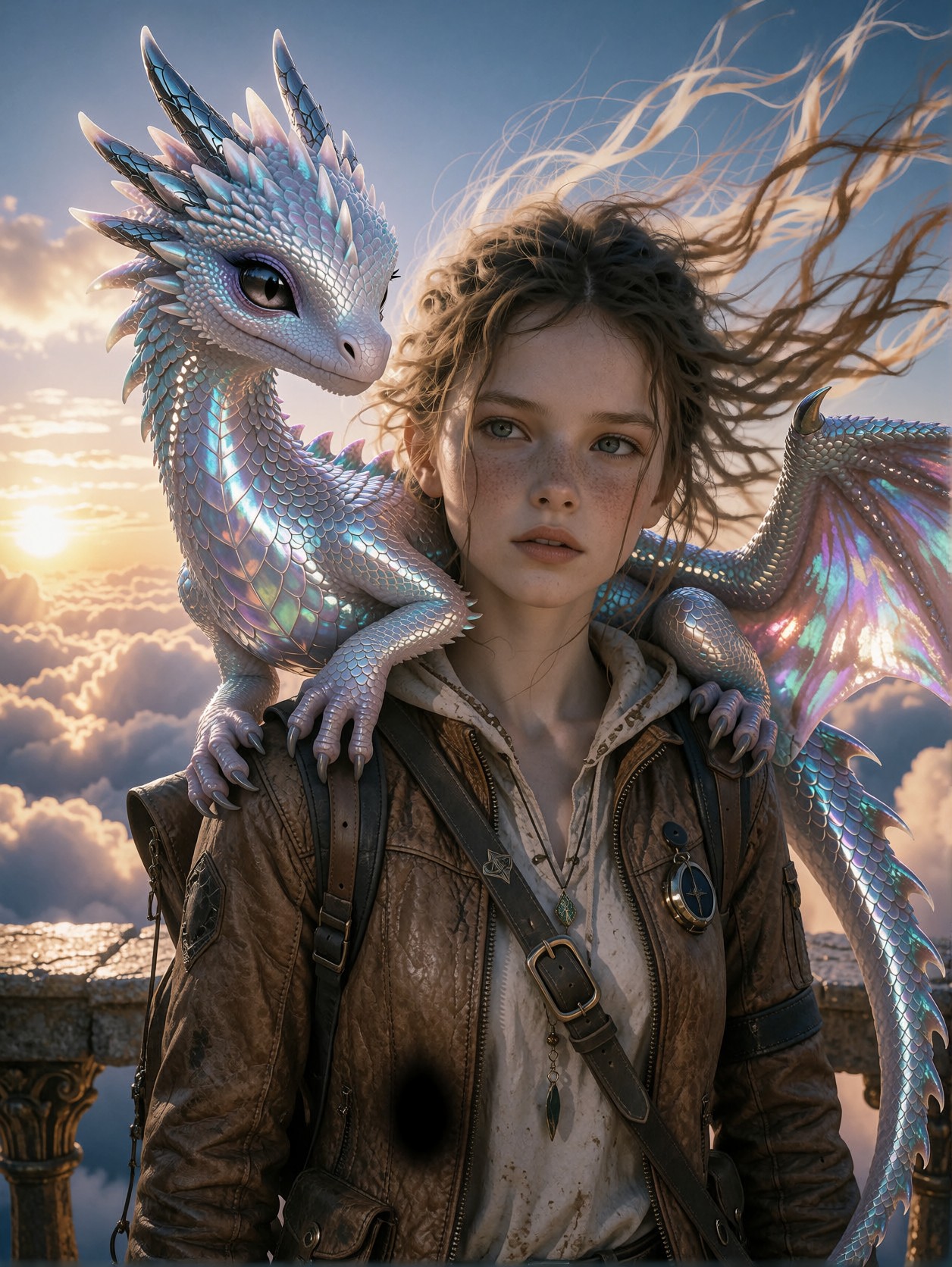
The sheer intricacy of a tiny, iridescent scaled dragon perched delicately on the shoulder of a high-definition fantasy explorer is what makes this image so compelling. It't just a dragon; it's a masterpiece of visual contrast—a miniature, shimmering fantasy powerhouse resting against the vast, atmospheric canvas of a cloud-blown sunset. Krea 2 excels here because it doesn't just as a simple image generator, but as a synthesis engine, allowing the hyper-detail requested—the wind-blown strands of hair, the texture of the leather jacket, and the fine scales—to coexist with the dramatic, painterly aesthetics introduced by the LoRAs.
The lighting is key: the clean, directional wash of the setting sun acts like a spotlight, separating the subject from the clouds and grounding the fantasy in photorealism. The dragon’s iridescent scales catch every facet of that light, moving the image beyond a standard illustration into the realm of high-end, concept-art marketing material 🐲.
Concept Art for Character Design and Cinematic Worlds
If you are working on character concept art for a high-budget RPG, a cinematic world-building project, or a digital art book, this is the prompt you need. It combines the raw fidelity of realism with the opulent, dramatic flare of high fantasy illustration.
This output is ideally suited for landscape or vertical portrait orientations (e.g., 16:9 or 3:4) to fully capture the scope of the balcony and the sweep of the clouds, while ensuring the tiny dragon remains a focal point. Avoid tight close-ups, as the setting and the dragon need room to breathe.
Settings for Krea 2 — Achieving Flawless Detail
Krea 2 is known for its intelligent blending capabilities, meaning the base prompt provides the structural reality while the LoRAs provide the soul. Since you are asking for extreme detail and high contrast, you want to push the detail_strength settings high, but be careful not to let the LoRAs overwhelm the core photorealistic prompt.
- Guidance Scale: Start at 7.5–10. Since you are requesting specific photorealistic details, a higher guidance scale helps the model adhere to the "zero artifacts" and "8k resolution" directives.
- Steps: Use 30–50 steps if available, to ensure the complex blending of the three LoRAs is executed with precision.
- Resolution: Aim for
2028x1080or higher for maximum HD detail capture, especially for the dragon's scales.
Mastering the Triple LoRA Blend Strategy
This is a high-risk, high-reward LoRA combination. You are merging Photorealism (Prompt) + Opulence (GPT) + Dark Mood (Ethereal) + Nostalgia (Horror). The key is to keep the "Photorealistic" LoRAs slightly lower to prevent the style from becoming a complete caricature.
- GPT style (55): Keep this high; it defines the celestial warmth and opulent golds of the scene.
- Horror 1980x (40): Use this as a *texture* layer—it adds grain and cinematic suspense, preventing the image from looking too clean or digital.
- Ethereal Dark Fantasy Painting (50): This sets the mood. Keep it balanced so it doesn't turn the sunset into a full gothic storm.
Five Ways to Push the Explorer Portrait Further
5 Targeted Variations for This Explorer Portrait
- Shift the time of day: Change "sunset" to "midnight storm, lightning tearing through the clouds" — The lighting instantly introduces high-drama and threat, turning the explorer becomes a survivor
- Change the dragon's state: Replace "tiny, iridescent scaled dragon" with "ancient, slumbering wyrm, scales like obsidian armor" — changes the dynamic from companion to massive guardian Environment Swap: Change "stone balcony" to "ruined temple spire" — adds history and vulnerability to the scene, suggesting the explorer is traversing a lost civilization Refine the style:: Swap "leather traveling jacket" for "burnished bronze scale armor" — shifts the genre from rugged adventurer to noble, high-fantasy warrior Atmosphere: Replace "clean lighting" with "volumetric dust, heavy sea-salt spray" — grounds the fantasy in a harsh, realistic, weathered environment
Two Prompts Ready to Generate
These two prompts push the boundaries of the original concept by introducing a dangerous storm and replacing the dragon scale changes, leveraging the complexity of Krea 2's blending ability.
Variation: Midnight Storm and Obsidan Wyrm — Shifts the entire tone from hopeful to perilous and epic, trading sunset light for violent energy.
HD detail restoration, ultra-detailed portrait of a young explorer on a ruined temple spire, midnight storm, lightning tearing through clouds, obsidian wyrm, ancient, scales like armor, intense. Krea 2 photorealistic, high contrast, 8k resolution.
HD detail restoration, ultra-detailed portrait of a young explorer on a ruined temple spire, midnight storm, lightning tearing through clouds, obsidian wyrm, ancient, scales like armor, intense. Krea 2 photorealistic, high contrast, 8k resolution.

Explore AI Generation Tools on Proxima.art
Proxima.art is a free AI image generator powered by Flux, Qwen, HiDream, and other state-of-the-art models. Browse prompts, copy them to the generator, and create stunning AI art instantly.