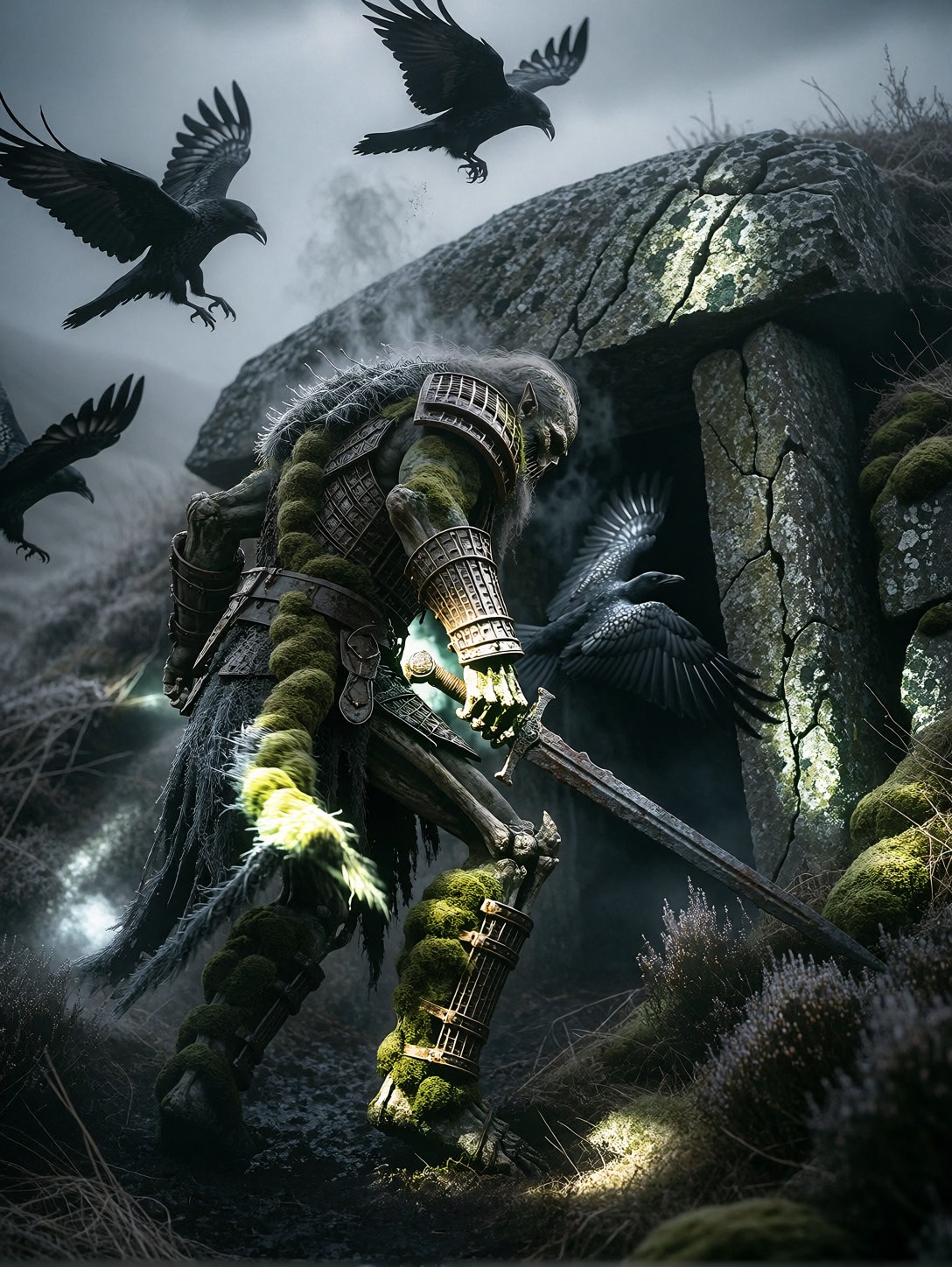


Moss, Rust, and Grey Dawn: Anatomy of a Draugr Awakening
Nothing sells dread like movement against stillness — and a draugr shouldering open its own burial slab while ravens explode from the doorway is exactly that. The prompt stacks three competing textures for Proxima Aurelia 2 to resolve: cracked lichen on armour, steam rising from frost, heather bending under a dragging sword blade. Each one gives the model a physical story to tell.
The 35mm anamorphic specification matters more than it looks. It stretches the fog horizontally, widens the mound's silhouette, and pushes the muted grey-green palette into that cold Scandinavian film look. Aurelia 2's strength in intelligent composition means the low doorway, the flock, and the dragging sword tend to arrange themselves into a readable frame without extra prompting.
Film Stills, Book Covers, and Grimdark Key Art
A wide cinematic shot like this lives in horizontal formats. Use it for grimdark novel covers (with title space in the fog), streaming-series key art, tabletop campaign splash pages, or atmospheric backdrops for video. Avoid tight portrait crops — they strangle the landscape and the sense of scale that makes the mound feel ancient.
One limitation: the oppressive silence instruction is a mood cue, not a visual one. It works by suppressing bright highlights and busy detail — expect a quieter image, not a literal effect.
Settings for Proxima Aurelia 2 — Feeding the Frost and Fog
Aurelia 2 rewards restraint. It reads visual storytelling from even simple prompts, so keep guidance moderate and let the LoRA stack carry the aesthetic weight.
- CFG / Guidance:
3.0–3.5— higher values start bleaching the fog and over-saturating the lichen - Steps: 30 for final quality; 12 for fast composition previews
- Resolution:
1664×928(16:9) or1920×1088for true cinematic framing — anamorphic needs width
If the ravens smear into the fog, add "sharp silhouettes, distinct wing shapes" — at these guidance levels Aurelia 2 will honor the correction without brightening the scene.
Balancing the Three LoRAs
- Fantasy Realism Enhancer at
1.00— the anchor. It keeps armour, moss, and skin grounded in believable material detail while preserving a painterly finish - Ethereal Dark Fantasy Painting at
0.50— supplies the dramatic low-key lighting and moody atmosphere this scene depends on; push to0.65for heavier brushwork - GPT style at
0.55— the risk here is its gilded, iridescent glow fighting the muted palette. At 0.55 it adds a subtle mythic scale to the fog light; drop to0.30if gold tones start creeping into the dawn
The stack works because Realism Enhancer dominates, Dark Fantasy shapes the light, and GPT style only whispers. Reverse those priorities and you get a luminous celestial scene — beautiful, but not this one.
Five Ways to Push the Draugr Scene Further
5 Targeted Variations for the Burial Mound Shot
- Flip the light: Replace "grey dawn" with "blood-red dusk, dying sun behind the mound" — the ravens become backlit silhouettes and the mood shifts from cold dread to apocalyptic omen
- Close the distance: Change "wide cinematic shot" to "low-angle medium shot, moss-covered face in focus, mound blurred behind" — trades scale for intimacy and facial horror
- Add a witness: Insert "a lone shepherd frozen mid-step in the foreground, sheep scattering" — introduces human scale and narrative tension, ideal for book covers
- Seasonal inversion: Swap "frost steaming" for "snow falling, drifts piled against the slab" — winter deepens the silence and adds falling-texture depth to the frame
- Vertical format: Rebuild as "low-angle vertical shot, towering draugr filling the frame, ravens circling above, 3:4" — poster-friendly, loses the landscape but gains menace
Two Prompts Ready to Generate
Both examples below apply variations directly, tuned for Aurelia 2 at the settings above.
Variation: blood-red dusk — the grey dawn becomes a dying sun, backlighting the ravens and shifting the mood toward apocalyptic omen
Cinematic Dark Fantasy, a moss-caked draugr shoulders open the massive stone slab of its burial mound, lichen cracking from its armored bones as a blood-red dusk burns behind the mound. Ravens explode upward, backlit silhouettes against the dying sun. Rusted sword dragging through heather, mist glowing ember-red. Wide cinematic shot, 35mm anamorphic lens, deep crimson and charcoal palette, dramatic low light, highly detailed, 8k
Variation: adding a witness — a lone shepherd in the foreground brings human scale and narrative tension to the awakening
Cinematic Dark Fantasy, a moss-caked draugr shoulders open the stone slab of its burial mound on a foggy Icelandic moor, ravens scattering from the doorway. In the foreground a lone shepherd frozen mid-step, sheep bolting across the heather, frost steaming off the creature's shoulders. Wide cinematic shot, 35mm anamorphic lens, muted grey-green palette, cold diffused dawn light, oppressive stillness, highly detailed, 8k
More Dark Fantasy Scenes Worth Exploring
These prompts share the same grim, painterly territory — armored figures, gothic atmosphere, and morally heavy storytelling: