Blueprints as the Real Subject: A Golden-Hour Professional Life Scene
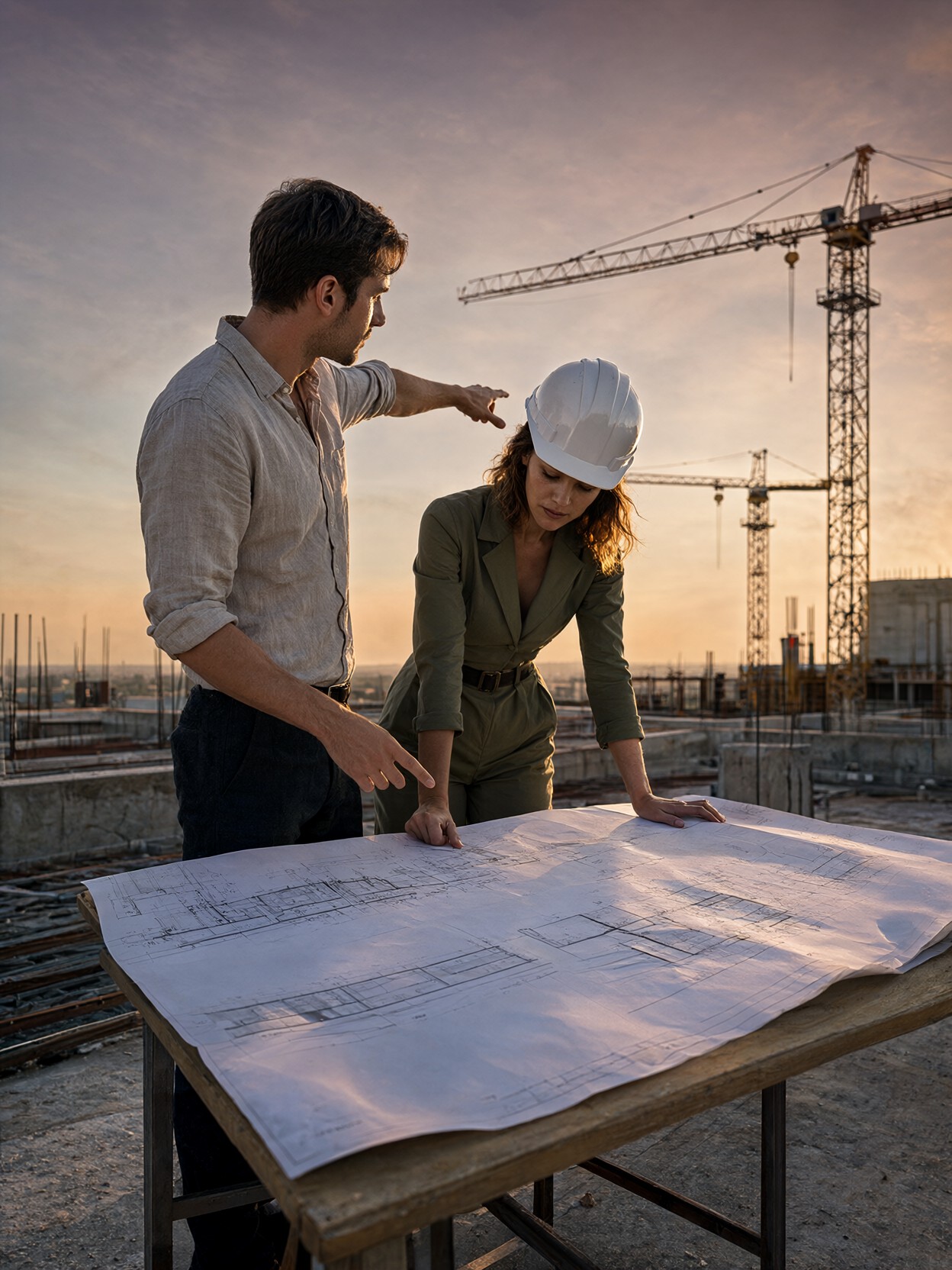
The blueprints are the real subject here — not the people, not the skyline, but the pinned paper with its razor-sharp lines and architectural annotations. Qwen 2.1's crisp integrated typography handles those fine print details natively, rendering text and line-work on the plans without the smearing that plagues most models at that scale. The golden hour does the rest: dusty orange bleeding into violet behind silhouetted cranes, warm light catching the woman's hair and the man's rolled-up linen sleeve. The low perspective (35mm at f/2.8) flattens the depth just enough to make the concrete edge feel precarious without distorting the figures. It's a "professional life" scene that reads like a frame from a mid-budget film — specific, grounded, and quietly dramatic.
Stock Photography, Editorial Spreads, and Film Still Mockups
Architectural and construction-industry editorial work needs exactly this kind of image: two credible professionals, a real-feeling location, and a narrative moment that implies story without saying it outright. Magazine covers for design publications, LinkedIn hero images for architecture firms, and pitch decks for construction tech startups all benefit from this level of photorealistic finish.
The prompt's "medium-wide shot" framing suits a 16:9 or 3:2 aspect ratio. A 3:4 portrait crop would compress the crane silhouettes and flatten the horizon line that gives the scene its scale. Stick to landscape for the full cinematic effect.
Settings for Qwen 2.1 — Leveraging Native 2K and Typography Strength
Qwen 2.1's native 2K output means you get fine blueprint line-work and skin pore detail without needing to upscale. The model's lifelike portrait lighting is exactly what the golden-hour reference in the prompt demands — no extra light-transport LoRA needed.
- Guidance scale:
3.5— the default sweet spot; the prompt is already highly specified, so the model doesn't need extra steering - Steps: 30 for maximum blueprint and skin texture fidelity; 12 steps if you're just checking composition
- Resolution:
1920×1080(16:9) for the cinematic frame, or1536×1024(3:2) for a more photographic feel
The Hasselblad and 35mm lens references in the prompt aren't decorative — Qwen 2.1 reads camera-specific language as a strong compositional and depth-of-field signal. Keep them in even if you swap the subject.
Five Ways to Push This Professional Life Scene Further
5 Concrete Twists on the Skyscraper Blueprint Prompt
- Shift the time of day: Replace "golden hour" and "dusty orange and violet sky" with "pre-dawn blue hour, sodium-vapor construction lights glowing amber" — the same scene becomes a night-shift story, colder and more urgent
- Swap the location type: Change "unfinished glass skyscraper" to "half-built bridge span over a river" — the cranes become gantry cranes, the blueprints become engineering schematics, and the horizon reference shifts to water
- Add a third element: Insert "a small dog in a safety vest sitting on the concrete edge, tail wagging" — the absurd specificity grounds the scene in real life and gives the composition a focal anchor at the bottom of frame
- Change the dynamic between the two: Replace "reviewing architectural blueprints" with "arguing over a site plan, one pointing aggressively, the other with arms crossed" — the professional life genre shifts from collaborative to confrontational, more dramatic for a film still
- Go interior: Swap the exterior for "inside the unfinished concrete shell, floor-to-ceiling raw columns, the same blueprints pinned to a plywood formwork panel, dust motes in a single shaft of light from an open elevator shaft" — loses the sky but gains claustrophobic depth
Two Prompts Ready to Generate
Both apply one of the variations above directly and are tuned for Qwen 2.1 at the settings listed. Keep the camera language — it's doing real work.
Variation: pre-dawn blue hour with sodium-vapor lighting — the same two professionals, but the mood shifts from warm collaboration to urgent night-shift focus
Realism, Cinematic Professional Life. Medium-wide shot of a young man and woman on the high-rise concrete edge of an unfinished glass skyscraper at pre-dawn blue hour, reviewing architectural blueprints pinned to a wooden table. The man in a rolled-up linen shirt points at a structural detail. The woman in an olive jumpsuit and white hard hat leans in, focused. Behind them, construction cranes silhouetted against a deep blue and amber sky lit by sodium-vapor floodlights. Shot on Hasselblad H6D-100c, 35mm f/2.8, low perspective, razor-sharp blueprint detail, concrete textures, natural skin pores, photorealistic, 8k
Variation: interior concrete shell — the sky is gone, replaced by raw columns and a single shaft of light through an open elevator shaft; the blueprints stay pinned to plywood formwork
Realism, Cinematic Professional Life. Medium-wide shot inside the unfinished concrete shell of a high-rise, floor-to-ceiling raw columns, a young man and woman reviewing architectural blueprints pinned to a plywood formwork panel. A single shaft of warm light cuts through an open elevator shaft, illuminating dust motes. The man in a linen shirt points at a load-bearing detail. The woman in an olive jumpsuit and hard hat studies the plan. Shot on Hasselblad H6D-100c, 35mm f/2.8, low perspective, razor-sharp blueprint and concrete detail, natural skin pores, photorealistic, 8k
Other Cinematic and Photorealistic Prompts Worth Exploring
These prompts push different moods and subjects but share the same commitment to specific, grounded realism — worth generating alongside the skyscraper scene to build a visual range: