
Violet Neon and Heavy Grain: How Krea 2 Captures Vintage Noir
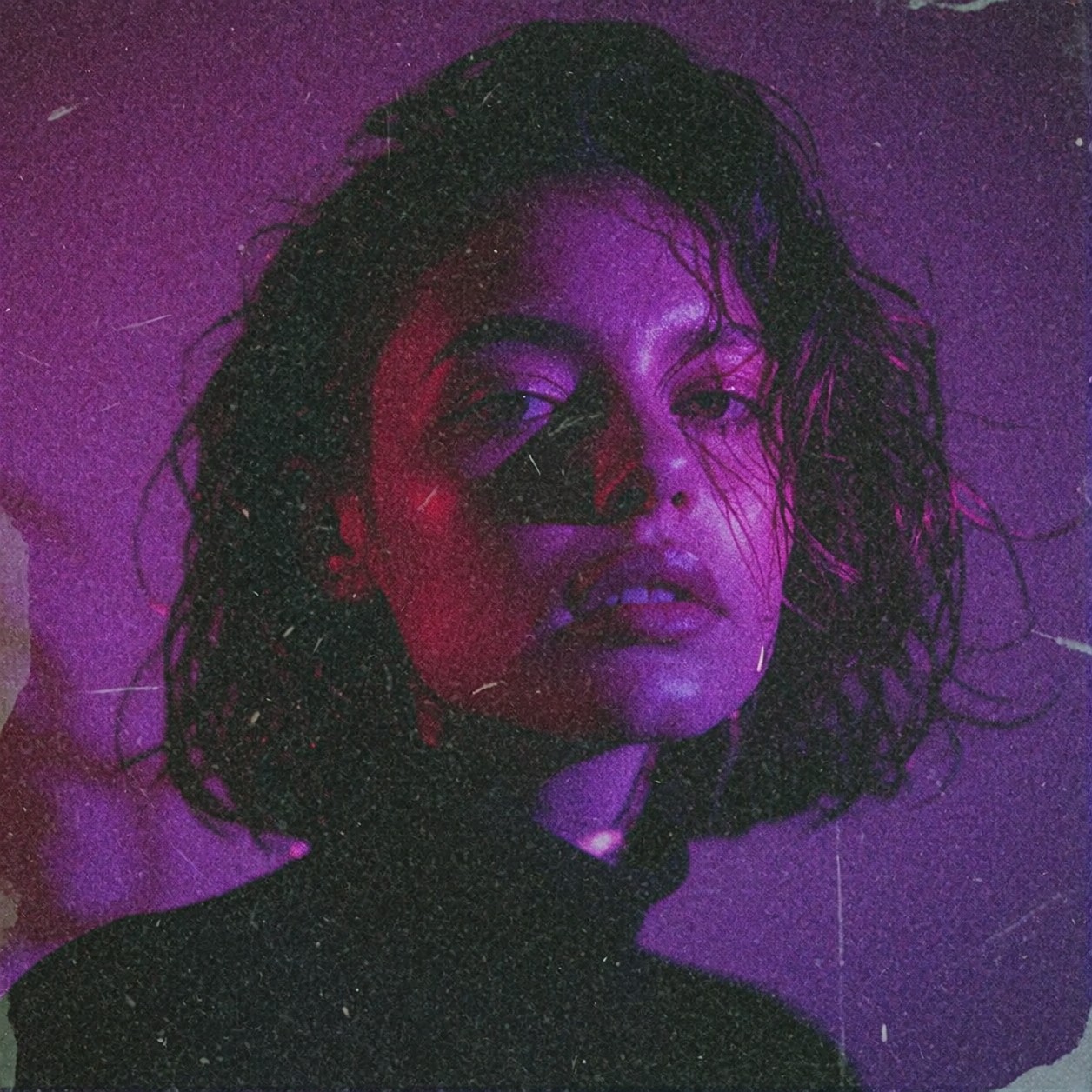
Deep purple and violet neon light creates a mood that is equal parts cyberpunk romance and analog nostalgia. This prompt relies on the tension between **sharp focus** and **heavy 35mm film grain**. While the subject remains crisp, the surrounding atmosphere dissolves into texture, mimicking the look of high-ISO Kodak film pushed to its limit. Krea 2 excels here because of its intelligent style blending capabilities; it treats the "vintage aesthetic" and "analog texture" not just as digital filters, but as environmental physics that wrap around the subject's form.
The result is a portrait that feels less like a generated render and more like a found photograph from a parallel timeline. The cinematic shadows do the heavy lifting for depth, carving out facial features while the neon light adds a surreal, atmospheric glow that separates the image from standard photography.
Album Art and Editorial Illustration
This setup is ideal for music production visuals—album covers, track art, or editorial illustrations for articles on retro-futurism and analog photography techniques. Because the prompt specifies "portrait," a vertical orientation is crucial to maintain composition balance and let the light spill downwards.
Use 768×1024 resolution; Krea 2 handles this aspect ratio beautifully, allowing the neon glow to fill the frame without distortion. Avoid landscape crops here, as they will cut off the atmospheric depth of the cinematic shadows.
Generation Settings for Krea 2
Krea 2 is known for its exceptional aesthetics and natural composition, so you want to guide it carefully to avoid oversaturating the neon colors or losing the texture detail in the grain.
- CFG / Guidance:
3.5–4.0. Krea's style blending is potent; keeping this moderate prevents the neon colors from turning into a flat, blown-out glow. - Steps: 28–30 for maximum texture fidelity in the film grain and analog artifacts.
- Resolution:
768×1024(Portrait) or1024×1024for a square, poster-ready format.
Krea 2's strength lies in its intelligent style blending — use this to your advantage by keeping the prompt concise. Let the model fill in the "vintage" details naturally rather than overloading it with adjectives.
The LoRA Effect
You are using the **Moody Film Grain Photography** LoRA at 100 (max weight). This is a heavy hand. At 100, the LoRA forces a complete color grade shift toward muted tones and adds significant soft edge blur. The image will look less like a digital file and more like a scanned print from a darkroom. If you want to keep the neon colors punchier while retaining the grain, try dropping this weight to 70.
Variations for This Neon Noir Portrait
5 Ways to Push the Vintage Aesthetic Further
- Shift the Palette: Replace "deep purple and violet neon" with "harsh teal and magenta split lighting". This creates a classic cyberpunk contrast that feels more aggressive and less romantic.
- Add Environmental Context: Insert "rain-slicked pavement reflection" or "foggy alleyway". The LoRA's color grading will interact beautifully with wet surfaces, turning the neon into streaks of light.
- Modify the Film Look: Change "heavy 35mm film grain" to "washed-out VHS tracking error and chromatic aberration". This shifts the vibe from 'classic noir' to 'lo-fi analog horror'. 📼
- Soften the Focus: Lower the LoRA weight to
70or change "sharp focus" to "slight lens flare on the edges". This lets the subject pop out of the grainier background more effectively. - Character Change: Swap the implied subject for "an old mechanic in a dim garage, grease on hands". The vintage aesthetic pairs perfectly with mechanical grit and oil-stained textures.
Two Prompts Ready to Generate
Apply two of the variations above directly — both are tuned for Krea 2 at the settings recommended above.
Variation: Cyberpunk split lighting and rain — teal and magenta neon creates a harsher, high-tech noir atmosphere
Moody atmospheric portrait illuminated by harsh teal and magenta split neon light, rain-slicked environment with wet reflections on skin, vintage aesthetic, heavy 35mm film grain, analog texture, sharp focus, cinematic shadows, lo-fi noir
Variation: VHS horror — swaps film grain for analog distortion, creating a glitchy, retro-tech aesthetic
Moody atmospheric portrait illuminated by deep purple and violet neon light, vintage aesthetic, washed-out VHS tracking error, chromatic aberration, analog noise, sharp focus on eyes, cinematic shadows, digital decay
More Vintage and Noir Inspirations
Other prompts in this category push the same moody, analog territory with different subjects and lighting setups: